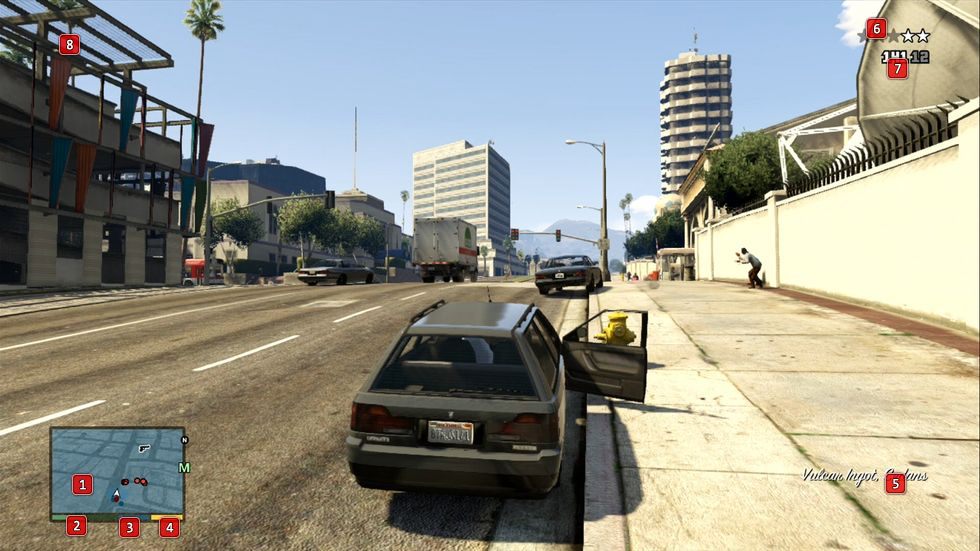
While performing a transaction (e.g. while in a store) the current amount of available cash and losses, or gains, will be displayed here.
GTA 5: User Interface guide
This section of the Grand Theft Auto V guide includes a detailed description of the user interface. You'll learn what particular icons mean in GTA 5.
In this part, you can learn about some of the elements of GTA 5 interface, to know where you can find all of the information that you need.. Depending on your current situation, some of the markings are available in the game only under certain conditions and they may temporarily appear in the place of the already existing ones. The detailed information can be found in the descriptions of individual elements.



- GTA 5 Guide
- GTA 5: Strategy Guide
- GTA 5: Basics
- GTA 5: Tips and Tricks
- GTA 5: How to unlock additional content on PS4, Xbox One?
- GTA 5: How to use cars and motorcycles?
- GTA 5: How to use boats?
- GTA 5: How to use airplanes, helicopters?
- GTA 5: How to choose equipment?
- GTA 5: How to make money quickly? The fastest way to get cash
- GTA 5: How to buy properties?
- GTA 5: How to play Stock Exchange?
- GTA 5: Wanted level - How to run away police?
- GTA 5: User Interface guide
- GTA 5: First-person mode
- GTA 5: List of all radio stations
- GTA 5: Game editions
- GTA 5: Choices during robberies
- GTA 5: All Endings
- GTA 5: Basics
- GTA 5: Strategy Guide
You are not permitted to copy any image, text or info from this page. This site is not associated with and/or endorsed by the developers and the publishers. All logos and images are copyrighted by their respective owners.
Copyright © 2000 - 2026 Webedia Polska SA for gamepressure.com, unofficial game guides, walkthroughs, secrets, game tips, maps & strategies for top games.