GTA Online: Protecting your money against other players
If you carry a lot of money on you, it would be a good idea to transfer them into a bank account. There are two ways to do this.
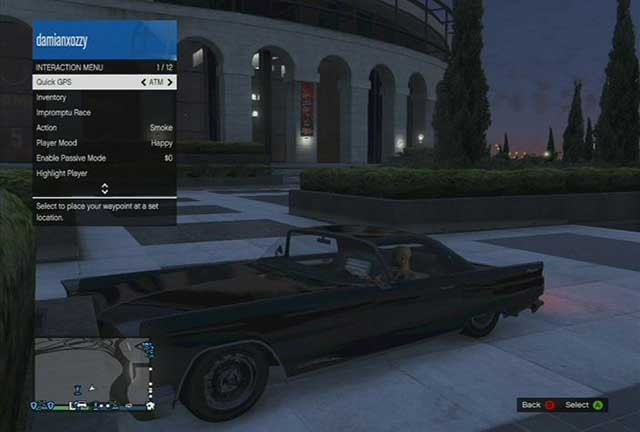
You can transfer money into your account using a network of ATMs located all around Los Santos and its surroundings. To do this, press and hold BACK (X360) or SELECT (PS3), to open interaction menu. In Quick GPS option search for ATM. The shortest route will appear on the map. When you get at the place, press right arrow, to use this. Select Deposit option and the money amount. Now you just need to confirm the operations and that is it. If you want to withdraw your money from the bank, follow the patterns as before, this time though select Withdraw option.
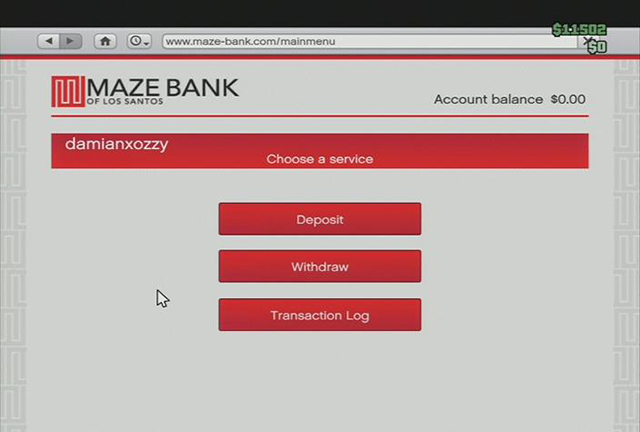
Money can be deposited or withdrawn from the account anywhere and anytime you want, as long as you are in Sandbox Mode. Open your cell phone with a proper button. Then open the internet browser. Enter Money and Services and open Maze Bank website. Click on the Main Menu and, depending on what you want to do, select Deposit or Withdraw, and set the amount of money.
If you want to check the history of all transactions (both made through ATMs and on the bank website), select Transaction Log.



- GTA 5 Guide
- GTA 5: Grand Theft Auto Online
- GTA 5 Online: Basics
- GTA Online: Character creation
- GTA Online: First steps
- GTA Online: Game menu and interaction menu
- GTA Online: The police
- GTA Online: Mounting a tracker
- GTA Online: Skills development
- GTA Online: Jobs
- GTA Online: Types of jobs
- GTA Online: Joining jobs
- GTA Online: Creating your own jobs
- GTA Online: Creator
- GTA Online: Deathmatch Creator
- GTA Online: Race Creator
- GTA Online: Capture Creator
- GTA Online: The Last Team Standing Creator
- GTA Online: Money
- GTA Online: Protecting your money against other players
- GTA Online: Shopping
- GTA Online: Stores
- GTA Online: Service points
- GTA Online: Online shops
- GTA Online: Real estate agencies
- GTA Online: Joining an existing crew
- GTA Online: Creating your own crew
- GTA Online: Crews
- GTA Online: Cars and tuning
- GTA Online: Weapons
- GTA Online: Past time activities
- GTA Online: Awards
- GTA 5 Online: Basics
- GTA 5: Grand Theft Auto Online
You are not permitted to copy any image, text or info from this page. This site is not associated with and/or endorsed by the developers and the publishers. All logos and images are copyrighted by their respective owners.
Copyright © 2000 - 2026 Webedia Polska SA for gamepressure.com, unofficial game guides, walkthroughs, secrets, game tips, maps & strategies for top games.