GTA Online: Joining jobs
With your cell phone
Press the top arrow to enter the cell phone menu. Here you can choose from two options: Quick Job and Jobs List.
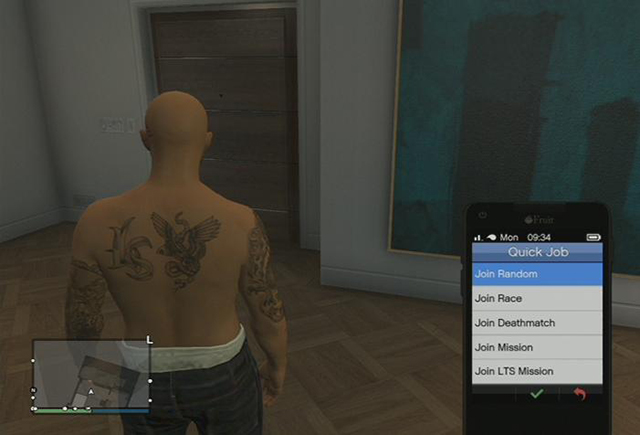
Quick Job menu allows you to join the closest job in-progress. Clicking on Join Random will send you to one of three types of games which are about to start. You can also manually set the type of game you want to join. Depending on your feelings, you can choose between Join Race, Join Deathmatch, and Join Mission. Jobs List, on the other hand, contains invitations from other players as well as missions given by NPCs (e.g. Simeon or Lamar). This tab also holds invitations to jobs which are still active, that is those not yet taken by other players.
You can also join jobs through the game menu. Go to Game menu > Online > Jobs > Join Jobs. Here too you can choose to join a random job or a specific game type.
Another way to join missions is through the contact menu. You just need to call one of the mission givers - be it Lamar - to get to play a mission.
Joining the game via the map
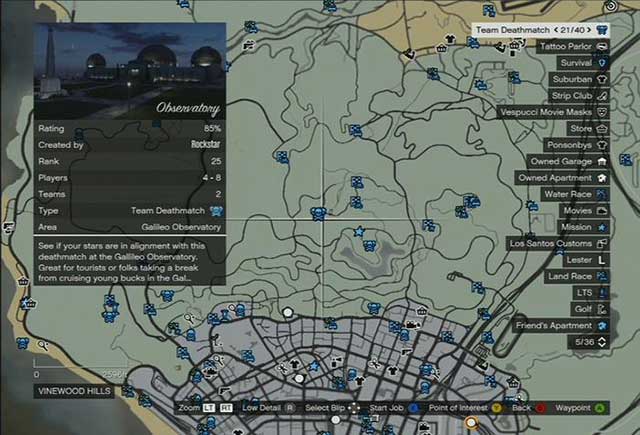
Press START, to open the GTA Online world map. There are icons which stand for particular jobs. There are two ways to get there. You can either set GPS route and drive there, or use "quick travel" option. If you choose the first option, point a job icon with the cursor and press A (X360) or X (PS3) to set the route to a given location. Remember to exit a vehicle before entering the job circle - you have to be on foot to start it.
Using "quick travel" is much easier. You just point a job icon with the cursor and press X (X360), SQUARE (PS3). You will be asked if you really want to start the job. Accept this and it is all set.
However, when joining a job via the map, there is a high probability that no one is currently playing this. In that case, you become the host, i.e. you create the job.



- GTA 5 Guide
- GTA 5: Grand Theft Auto Online
- GTA 5 Online: Basics
- GTA Online: Character creation
- GTA Online: First steps
- GTA Online: Game menu and interaction menu
- GTA Online: The police
- GTA Online: Mounting a tracker
- GTA Online: Skills development
- GTA Online: Jobs
- GTA Online: Types of jobs
- GTA Online: Joining jobs
- GTA Online: Creating your own jobs
- GTA Online: Creator
- GTA Online: Deathmatch Creator
- GTA Online: Race Creator
- GTA Online: Capture Creator
- GTA Online: The Last Team Standing Creator
- GTA Online: Money
- GTA Online: Protecting your money against other players
- GTA Online: Shopping
- GTA Online: Stores
- GTA Online: Service points
- GTA Online: Online shops
- GTA Online: Real estate agencies
- GTA Online: Joining an existing crew
- GTA Online: Creating your own crew
- GTA Online: Crews
- GTA Online: Cars and tuning
- GTA Online: Weapons
- GTA Online: Past time activities
- GTA Online: Awards
- GTA 5 Online: Basics
- GTA 5: Grand Theft Auto Online
You are not permitted to copy any image, text or info from this page. This site is not associated with and/or endorsed by the developers and the publishers. All logos and images are copyrighted by their respective owners.
Copyright © 2000 - 2026 Webedia Polska SA for gamepressure.com, unofficial game guides, walkthroughs, secrets, game tips, maps & strategies for top games.