Baldurs Gate 3: PC controls - gamepad
Last update:
This guide page provides details on how to play Baldur's Gate 3 with a controller. In the below tables, we collated the control buttons with an explanation of their uses within the game.
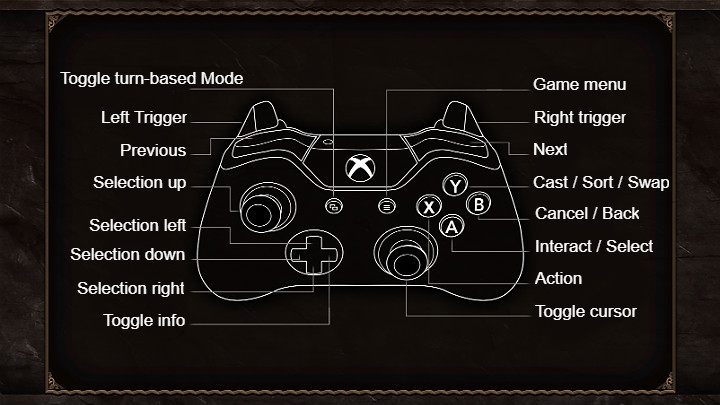
 | Enable cursor |
 | Cast / Sort / Replace |
 | Cancel / Return |
 | Interaction / Select |
 | Action |
 | Previous |
 | Next |
 | Left trigger |
 | Right trigger |
 | Enable turn mode |
 | Game Menu |
 | Choice up |
 | Choice left |
 | Choice down |
 | Choice right |
 | Enable information |



- Baldurs Gate 3 Guide, Walkthrough
- Baldur's Gate 3: Game guide
- Baldur's Gate 3: Appendix
- Baldur's Gate 3: Adult Content in BG3
- Baldurs Gate 3: Release date
- Baldurs Gate 3: PC system requirements
- Baldurs Garte 3: Keybinds/PC controls - keyboard and mouse
- Baldurs Gate 3: PC controls - gamepad
- Baldurs Gate 3: Graphics settings
- Baldurs Gate 3: Which to choose - Vulkan or DX11?
- Baldur's Gate 3: Can you transfer save from the early access?
- Baldur's Gate 3: Co-op
- Baldur's Gate 3: Language versions
- Baldurs Gate 3: PS5 and Xbox Series X versions
- Baldur's Gate 3: Appendix
- Baldur's Gate 3: Game guide
You are not permitted to copy any image, text or info from this page. This site is not associated with and/or endorsed by the developers and the publishers. All logos and images are copyrighted by their respective owners.
Copyright © 2000 - 2026 Webedia Polska SA for gamepressure.com, unofficial game guides, walkthroughs, secrets, game tips, maps & strategies for top games.