Cyberpunk 2077: Radio stations - how to switch?
On this page of the Cyberpunk 2077 guide, we tell you how to switch radio stations . You will also learn how to turn the radio offand if it's possible to change the volume of the radio in the game.
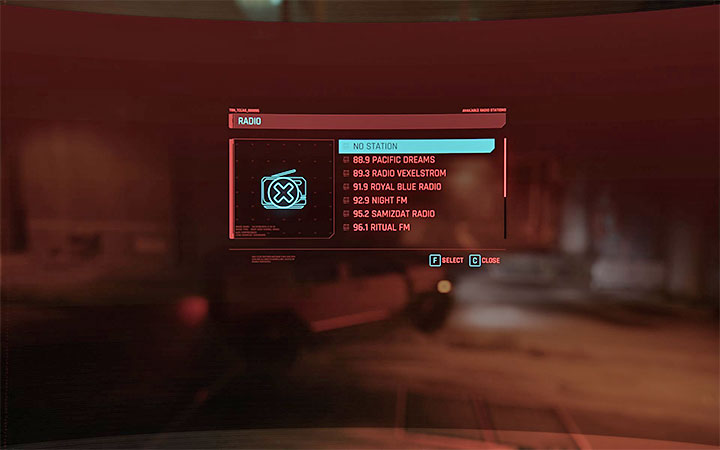
You can listen to the radio in Cyberpunk 2077 while driving vehicles, motorcycles included. By default, the game automatically turns the radio on when you enter the vehicle and selects a random radio station. You can change stations and this is done by holding down the radio key ('R' key in the PC version). This will bring up a list of available stations.
You can also turn the radio off completely. To do this, go to the top of the list after calling the radio station window.
You can adjust the volume of the radio in the Audio tab in the game options. Additionally, you will find a setting to mute licensed music in the game options – this is very useful if you plan to stream the game or publish excerpts from the game to Youtube, but are afraid of copyright infringement. Thanks to this setting, you don't have to give up the music in the game altogether, because only original songs will be played.



- Cyberpunk 2077 Guide
- Cyberpunk 2077: Game Guide
- Cyberpunk 2077: Appendix
- Cyberpunk 2077: Update 2.0 - all changes and novelties
- Cyberpunk 2077: System requirements
- Cyberpunk 2077: Controls
- Cyberpunk 2077: Game versions
- Cyberpunk 2077: Game length
- Cyberpunk 2077: Pre-order - how to place/cancel?
- Cyberpunk 2077: Radio stations - how to switch?
- Cyberpunk 2077: TPP, looking at V
- Cyberpunk 2077: Nudity Censorship - how does it work?
- Cyberpunk 2077: Damage numbers - how to turn off?
- Cyberpunk 2077: Blur on consoles - how to reduce it?
- Cyberpunk 2077: Refunding the game - how and until when?
- Cyberpunk 2077: Cluttered HUD/interface - what to turn off?
- Cyberpunk 2077: Optimal graphics settings - how to increase FPS?
- Cyberpunk 2077: Is it worth playing in 2022?
- Cyberpunk 2077: Appendix
- Cyberpunk 2077: Game Guide
You are not permitted to copy any image, text or info from this page. This site is not associated with and/or endorsed by the developers and the publishers. All logos and images are copyrighted by their respective owners.
Copyright © 2000 - 2026 Webedia Polska SA for gamepressure.com, unofficial game guides, walkthroughs, secrets, game tips, maps & strategies for top games.